1. XML 레이아웃의 기본 구조
XML 파일의 구성 요소
<?xml version="1.0" encoding="utf-8"?>
<androidx.constraintlayout.widget.ConstraintLayout xmlns:android="http://schemas.android.com/apk/res/android"
    xmlns:app="http://schemas.android.com/apk/res-auto"
    xmlns:tools="http://schemas.android.com/tools"
    android:id="@+id/main"
    android:layout_width="match_parent"
    android:layout_height="match_parent"
    tools:context=".MainActivity">
</androidx.constraintlayout.widget.ConstraintLayout>
각 요소 설명
1. XML 선언
<?xml version="1.0" encoding="utf-8"?>- xml version: XML 문서 버전 (1.0이 표준)
- encoding: 문자 인코딩 방식 (utf-8이 권장)
2. 루트 요소 (Root Element)
<androidx.constraintlayout.widget.ConstraintLayout>- 전체 레이아웃을 감싸는 최상위 컨테이너
- androidx: Android Jetpack 라이브러리 패키지 (Android Support Library의 개선된 버전으로 하위 호환성 지원)
- 반드시 하나만 존재해야 함
3. 네임스페이스 (xmlns - XML NameSpace)
xmlns:android="http://schemas.android.com/apk/res/android"
xmlns:app="http://schemas.android.com/apk/res-auto"
xmlns:tools="http://schemas.android.com/tools"| 네임스페이스 | 용도 | 예시 |
|---|---|---|
| android: | 안드로이드 표준 속성 | android:layout_width |
| app: | 사용자 정의/라이브러리 속성 | app:layout_constraintTop_toTopOf |
| tools: | 디자인 타임 전용 (빌드시 제거) | tools:context, tools:text |
tools 네임스페이스 특징: 빌드 도구가 APK 생성 시 자동으로 제거하여 APK 크기나 런타임 동작에 영향 없음
4. 속성 (Attributes)
android:id="@+id/main"
android:layout_width="match_parent"
android:layout_height="match_parent"
tools:context=".MainActivity"
XML 기본 문법 규칙
1. 태그 구조
<TagName attribute="value">
    <!-- 자식 요소들 -->
</TagName>

<!-- 자식이 없는 경우 -->
<TagName attribute="value" />
2. ID 리소스 생성
android:id="@+id/my_view"    <!-- 새 ID 생성 -->
android:layout_above="@id/existing_view"  <!-- 기존 ID 참조 -->
3. 리소스 참조
android:text="@string/hello_world"      <!-- 문자열 리소스 -->
android:background="@color/primary"     <!-- 색상 리소스 -->
android:src="@drawable/ic_launcher"     <!-- 드로어블 리소스 -->
2. 다양한 화면을 위한 안드로이드 단위 체계
DPI(화면 밀도)란 무엇인가?
- 1인치 안에 포함된 픽셀(점)의 개수를 나타내는 화면 밀도 측정 단위
- 높은 DPI = 더 선명하고 세밀한 화면
- 안드로이드 기준점: 160 DPI (MDPI - Medium Density)
안드로이드 밀도 분류
| **분류** | DPI | 스케일 비율 | 해상도 |
| --- | --- | --- | --- |
| **LDPI** | ~120 DPI | 0.75x | 240×320 |
| **MDPI** | ~160 DPI | 1.0x (기준) | 320×480 |
| **HDPI** | ~240 DPI | 1.5x | 480×800 |
| **XHDPI** | ~320 DPI | 2.0x | 720×1280 |
| **XXHDPI** | ~480 DPI | 3.0x | 1080×1920 |
| **XXXHDPI** | ~640 DPI | 4.0x | 1440×2560 |
안드로이드 단위 체계:dp, sp, px 단위
| 단위 | 설명 | 계산 공식 |
|---|---|---|
| dp (density-independent pixels) | 화면 밀도와 무관한 가상 픽셀 | px = dp × (기기 DPI ÷ 160) |
| sp (scale-independent pixels) | 사용자 폰트 설정 반영하는 가상 픽셀 | px = sp × (기기 DPI ÷ 160) × (사용자 폰트 크기 설정)(옛날방식) * 안드로이드 34(U OS)부터 sp 계산 방식이 비선형으로 변경되어, 선형 공식은 더이상 존재하지 않음 |
| px (pixels) | 물리적 픽셀 | 1px = 화면의 실제 1픽셀 |
구체적 예시로 이해하기: : 100dp 크기의 버튼을 다양한 기기에서 표시
| 기기 | DPI | 실제 픽셀 크기 | 물리적 크기(인치) |
|---|---|---|---|
| 기본 기기 | 160 DPI | 100px | 0.625인치 |
| 고해상도 기기 | 320 DPI | 200px | 0.625인치 |
| 저해상도 기기 | 120 DPI | 75px | 0.625인치 |
- 픽셀 크기는 다름: 같은 100dp이지만 실제 픽셀 개수는 75px~200px로 다름
- 물리적 크기는 동일: 모든 기기에서 실제 손가락으로 누르는 버튼 크기는 0.625인치로 동일
- 계산 공식: 물리적 크기 = 픽셀 크기 ÷ DPI
- 100px ÷ 160 DPI = 0.625인치
- 200px ÷ 320 DPI = 0.625인치
결론 : dp와 sp를 사용할까?
- dp: 기기마다 다른 화면 밀도에 관계없이 일관된 물리적 크기 보장
- sp: 사용자의 접근성 설정(큰 글자 선호 등)을 존중하여 텍스트 크기 조절
3. 안드로이드 UI의 기본, View와 ViewGroup
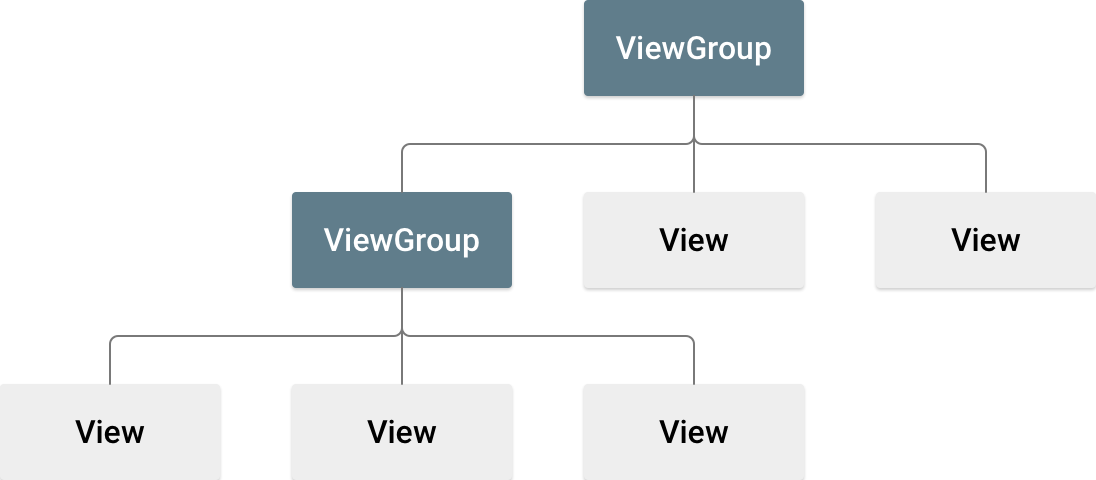
View와 ViewGroup의 역할과 상속 관계
java.lang.Object
    ↓
android.view.View (기본 View 클래스)
    ↓
├── android.widget.TextView
├── android.widget.ImageView
├── android.widget.Button
├── android.widget.EditText
├── android.widget.ProgressBar
└── android.view.ViewGroup (컨테이너 클래스)
        ↓
    ├── android.widget.LinearLayout
    ├── android.widget.RelativeLayout
    ├── android.widget.FrameLayout
    ├── androidx.constraintlayout.widget.ConstraintLayout
    ├── android.widget.ScrollView
    ├── android.widget.ListView
    └── androidx.recyclerview.widget.RecyclerView
View (기본 뷰)
- 화면에 그려지는 기본 단위
- 사용자와 직접 상호작용
- 다른 View를 포함할 수 없음
- 예: TextView, Button, ImageView
ViewGroup (뷰 그룹)
- 다른 View나 ViewGroup을 포함하는 컨테이너
- 레이아웃과 배치를 담당
- View를 상속받음 (ViewGroup도 View임)
- 예: LinearLayout, ConstraintLayout, RecyclerView
ViewGroup은 상속(inheritance)과 조합(composition)을 모두 사용:
- ViewGroup IS-A View (상속 관계)
- ViewGroup HAS-A Views (조합 관계)
자주 사용되는 View 컴포넌트 정리
1. 텍스트 관련
- TextView: 읽기 전용 텍스트 표시
- EditText: 사용자 입력 가능한 텍스트
- Button: 클릭 가능한 텍스트 버튼
2. 이미지 관련
- ImageView: 이미지 표시
- ImageButton: 클릭 가능한 이미지 버튼
3. 입력 관련
- CheckBox: 체크박스
- RadioButton: 라디오 버튼 (RadioGroup과 함께 사용)
- Switch: 스위치 토글
4. 진행상황 표시
- ProgressBar: 로딩 표시
- SeekBar: 슬라이더
리스트 View - ListView vs RecyclerView 비교:
| 특징 | ListView | RecyclerView |
|---|---|---|
| 도입 시기 | Android 1.0 (2008) | Android 5.0 (2014) |
| 성능 | 기본적인 뷰 재사용 | ViewHolder 패턴 강제 + 효율적 재사용 |
| 레이아웃 | 세로 리스트만 가능 | 세로/가로/그리드/커스텀 모두 가능 |
| 애니메이션 | 제한적 | 풍부한 아이템 애니메이션 |
| 복잡도 | 간단한 구현 | 복잡하지만 유연함 |
| 현재 상태 | "Legacy" 분류됨 | 적극 권장 |
4. Layout(ViewGroup) 컴포넌트 정리
LinearLayout과 ConstraintLayout 을 중심으로 스크롤이 필요하거나 Fragement 사용시 Layout을 추가로 조사하였습니다.
LinearLayout: 순차적 배치의 기본

<LinearLayout
    android:orientation="vertical"     <!-- 세로 배치 --> // 방향 결정
    android:layout_width="match_parent"
    android:layout_height="wrap_content">
    <!-- 자식 뷰들이 세로로 순차 배치 -->
    // 자식 뷰 android:layout_weight 비율 결정(horizontal : 가로 / vertical : 세로)
</LinearLayout>- 동작 원리: 자식 뷰들을 한 방향(horizontal/vertical)으로 순차 배치
- 장점:
- 간단하고 직관적인 사용법
- 균등 분할이나 비율 배치에 유용
- 단점:
- 중첩 시 성능 저하: 복잡한 UI를 위해 LinearLayout을 중첩하면 측정(measure) 과정이 중복되어 성능 저하
- 복잡한 상대적 배치 어려움
중첩 성능 문제 예시
  <!-- 성능에 나쁜 중첩 구조 -->
  <LinearLayout android:orientation="vertical">
      <LinearLayout android:orientation="horizontal">
          <LinearLayout android:orientation="vertical">
              <!-- 깊은 중첩으로 인한 측정 과정 반복 -->
          </LinearLayout>
      </LinearLayout>
  </LinearLayout>
안드로이드가 UI 구성 런타임 과정 중 성능 저하
- 측정 단계: 안드로이드가 각 레벨마다 크기를 계산해야 함
- 레이아웃 단계: 각 레벨마다 자식들의 위치를 배치해야 함
- 그리기 단계: 각 레벨마다 화면에 그려야 함
RelativeLayout - 상대적 위치 배치

<RelativeLayout
    android:layout_width="match_parent"
    android:layout_height="match_parent">
    <TextView
        android:id="@+id/title"
        android:layout_centerHorizontal="true"    <!-- 수평 중앙 -->
        android:layout_alignParentTop="true" />   <!-- 부모 상단에 정렬 -->
</RelativeLayout>- 동작 원리: 부모나 다른 자식 뷰를 기준으로 상대적 위치 설정
- 장점: LinearLayout보다 플랫한 구조 가능
- 단점:
- 복잡한 레이아웃에서 성능 이슈 (뷰 관계 해석에 시간 소요)
- ConstraintLayout에 비해 기능 제한적
- 사용 시기: ConstraintLayout 사용 불가능한 구 버전 지원 시
ConstraintLayout - 제약 기반(Constraint-based) 레이아웃

<androidx.constraintlayout.widget.ConstraintLayout
    android:layout_width="match_parent"
    android:layout_height="match_parent">
    <TextView
        android:id="@+id/title"
        app:layout_constraintTop_toTopOf="parent"
        app:layout_constraintStart_toStartOf="parent"
        app:layout_constraintEnd_toEndOf="parent" />
</androidx.constraintlayout.widget.ConstraintLayout>- 동작 원리: 각 뷰에 제약조건(constraint)을 설정하여 위치와 크기 결정
- 장점:
- 플랫한 계층 구조: 모든 자식 뷰가 한 레벨에 존재하여 성능 최적화
- 반응형 디자인: 다양한 화면 크기에 자동 적응
- 체인과 가이드라인 등 유연한 배치 옵션 제공
ConstraintLayout 기본 제약조건
<!-- 부모에 대한 제약 -->
app:layout_constraintTop_toTopOf="parent"
app:layout_constraintStart_toStartOf="parent"
app:layout_constraintEnd_toEndOf="parent"

<!-- 다른 뷰에 대한 제약 -->
app:layout_constraintTop_toBottomOf="@id/title"
app:layout_constraintStart_toEndOf="@id/icon"
FrameLayout - 단일 컨테이너
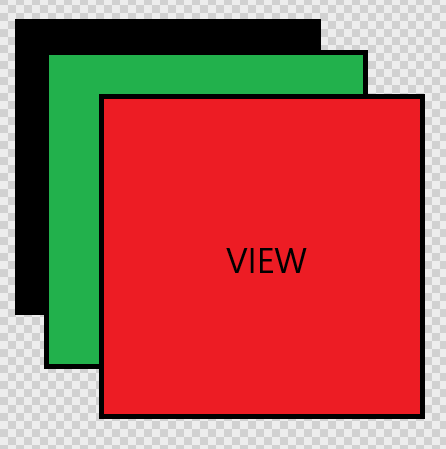
<FrameLayout
    android:layout_width="match_parent"
    android:layout_height="match_parent">
    <!-- 자식 뷰들이 겹쳐서 배치됨 -->
</FrameLayout>- 동작 원리: 자식 뷰들을 겹쳐서 배치 (z-order 순서)
- 장점: 비교적 가볍고 빠른 성능
- 사용 시기: Fragment 컨테이너, 단일 뷰 표시, 뷰 겹치기
ScrollView - 스크롤 컨테이너
<ScrollView
    android:layout_width="match_parent"
    android:layout_height="match_parent">
    <!-- 하나의 직속 자식만 가능 -->
    <LinearLayout>
        <!-- 실제 콘텐츠들 -->
    </LinearLayout>
</ScrollView>- 동작 원리: 콘텐츠가 화면을 벗어날 때 스크롤 가능하게 함
- 제한사항: 반드시 하나의 직속 자식만 가질 수 있음
그외 Layout들:
- TableLayout: 표 형식으로 뷰를 배치하는 레이아웃 ( like.태그) - ConstraintLayout가 대체 가능
- AbsoluteLayout: 절대적인 좌표를 사용해 뷰를 배치하는 구식 레이아웃 - deprecated(사용 중단 권고)
- GridLayout: 행과 열을 이용해 격자 형태로 뷰를 배치하는 레이아웃
- CoordinatorLayout: 뷰 간의 상호작용 및 애니메이션을 위한 레이아웃
참고자료
- Android 공식 문서 - Tools 속성
- Android 공식 문서 - 다양한 픽셀 밀도 지원
- MindOrks - DPI 상세 설명
- Android 공식 문서 - Layouts in Views
- Android 공식 문서 - View 클래스
- Android 공식 문서 - ViewGroup
- Android 공식 문서 - RecyclerView
- Android 공식 문서 - ListView
- Android 공식 문서 - LinearLayout
- Android 공식 문서 - RelativeLayout
- Android 공식 문서 - ConstraintLayout
- Android 공식 문서 - FrameLayout
- Android 공식 문서 - ScrollView
'CS 기초부터 한 걸음씩' 카테고리의 다른 글
| [Android] Jetpack Compose 기본 개념 - View 시스템과의 차이점 (2) | 2025.08.25 |
|---|---|
| [Android] Fragment 개념 정리 (4) | 2025.08.21 |
| [Android] 안드로이드 앱 구조 정리 (1) | 2025.08.19 |
| [Android] Android Studio Logcat과 로그 레벨 (3) | 2025.08.18 |
| [Android] Activity와 Activity Lifecycle 기초 개념 (5) | 2025.08.18 |